Run your jobsites without the paperwork chase
Jobs, submittals, RFIs, change orders, crew dispatch by text, daysheets, payroll hours, equipment and bids in one place: on the web for the office and on the phone for the field.
 Click to enlarge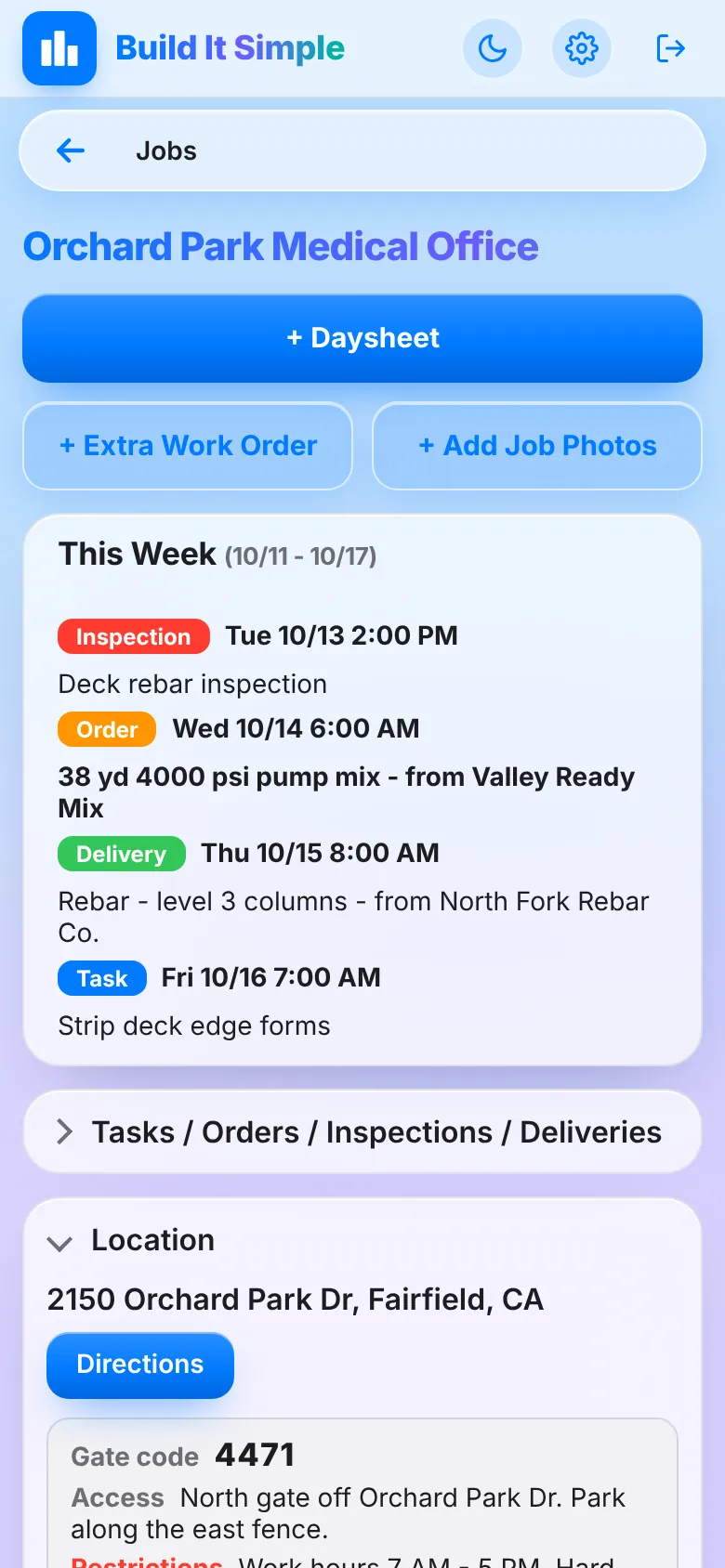
From the bid to the closeout, nothing gets typed twice
Each step picks up what the last one left behind. Click a step to see the screens.
See what it does
Real screens from the app, filled with a demo company. Pick an area, or let it play.
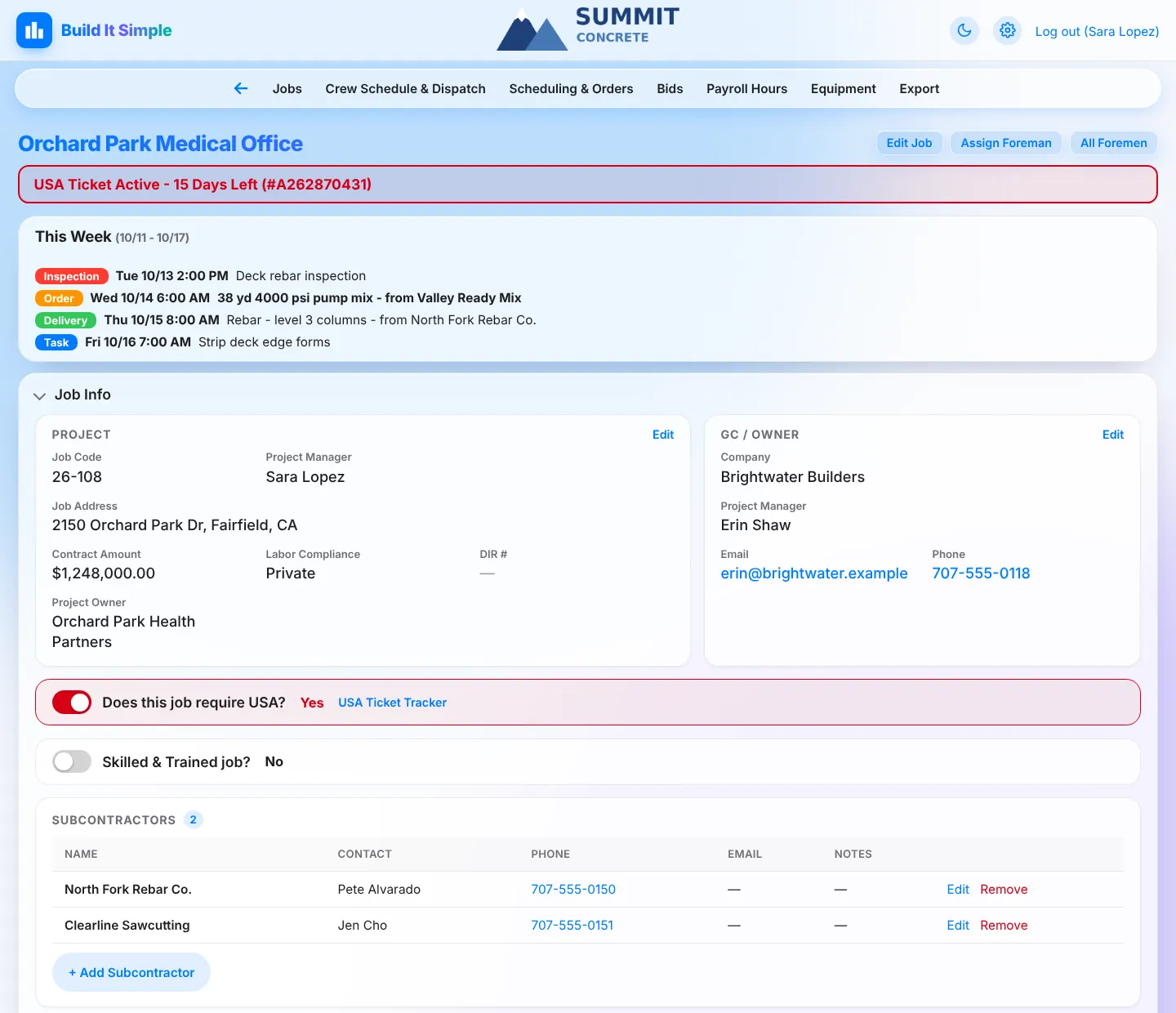
Every job on one page
Job info, documents, field records and what’s coming up this week, together on one page, and a Jobs list that shows what’s running late.
Every job, one pageAll of a job’s info, documents and field records live in one place you can scan in seconds.
- Job page with Job Info (code, PM, address, contract, labor compliance, DIR #, owner, GC contact) plus subcontractor, supplier and vendor lists
- Collapsible, drag-to-reorder sections, each showing a quick count (e.g. ‘2 total · 1 pending · $12,400 approved’)
- ‘This Week’ box of the job’s tasks, orders, inspections and deliveries, color coded
- Job Closeout: one zip of every file, a checklist of what’s still open, then storage is cleaned up after 7 days
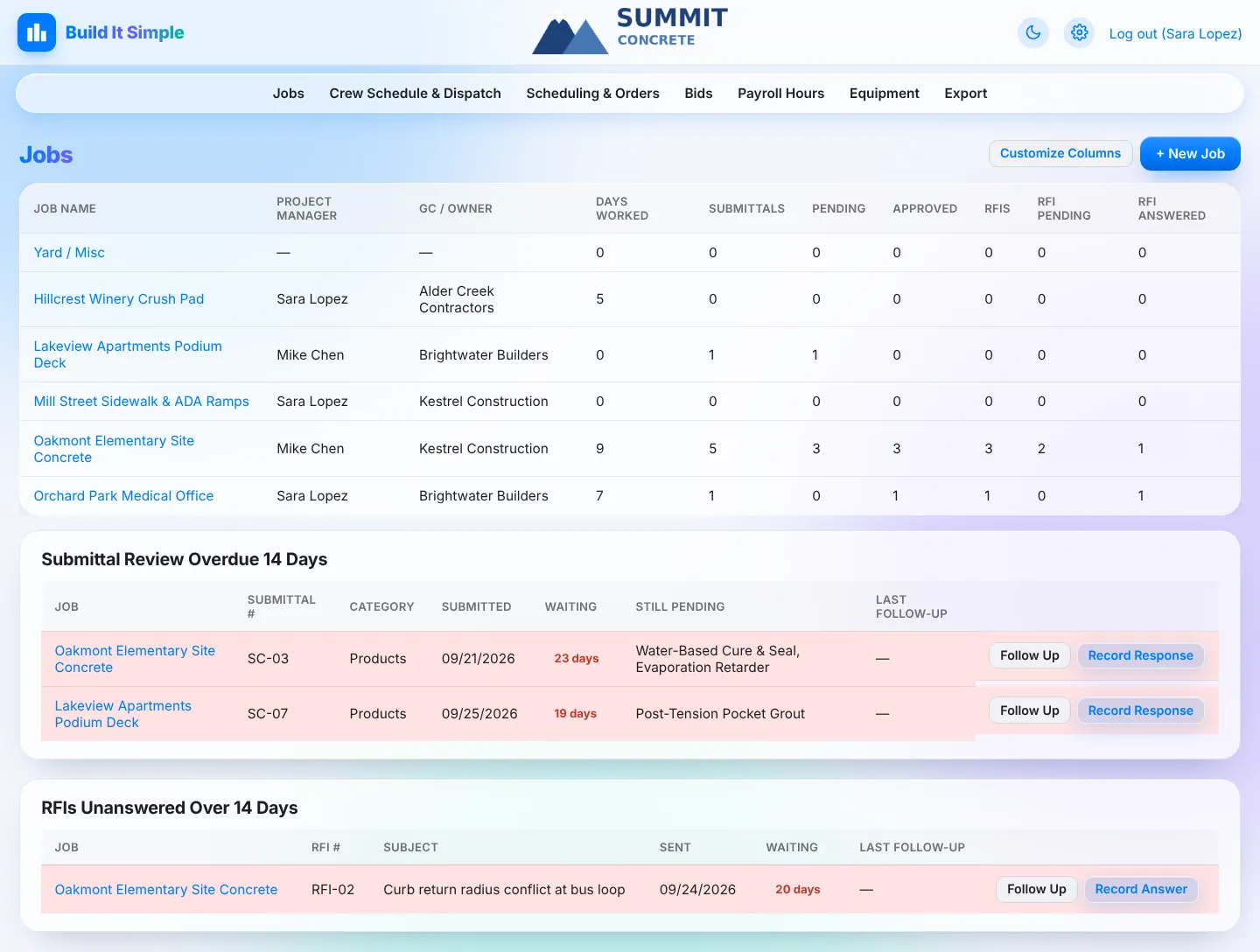
Jobs list that flags what’s lateSee what needs a nudge without opening every job.
- Customizable, sortable columns: PM, GC / Owner, submittal and RFI counts, days worked, date started and more
- ‘Submittal Review Overdue’ and ‘RFIs Unanswered’ panes list anything waiting longer than your follow-up days
- Follow Up builds a ready-to-send email draft with the original attached and logs the follow-up date
- Bulk job import from CSV; Move to Jobs creates a job straight from an awarded bid
USA ticket trackingNever dig without a live ticket.
- Mark a job as needing USA and a red banner shows until a ticket is entered
- Tickets count down their 28 days (‘USA Ticket Active - 15 Days Left’) and show Expired after
- Shown on the job page; can be switched off when no longer required
Project documents in one placeDirectives, safety plans, CADs, correspondence, schedules, bids, take-offs and quotes, all filed by job.
- Add, edit, replace and delete files per section, with page counts read from PDFs automatically
- Quote reading (optional): drop in a quote PDF or photo and AI fills in vendor, scope, type, amount and date for you to check
- Quote and change order statuses tracked right in the table
- Client directory: edit a GC once and every linked job updates
 Click to enlarge
Submittals and RFIs that don’t slip
Build transmittals from your product library, track every response, and turn a foreman’s field question into an RFI in one click.
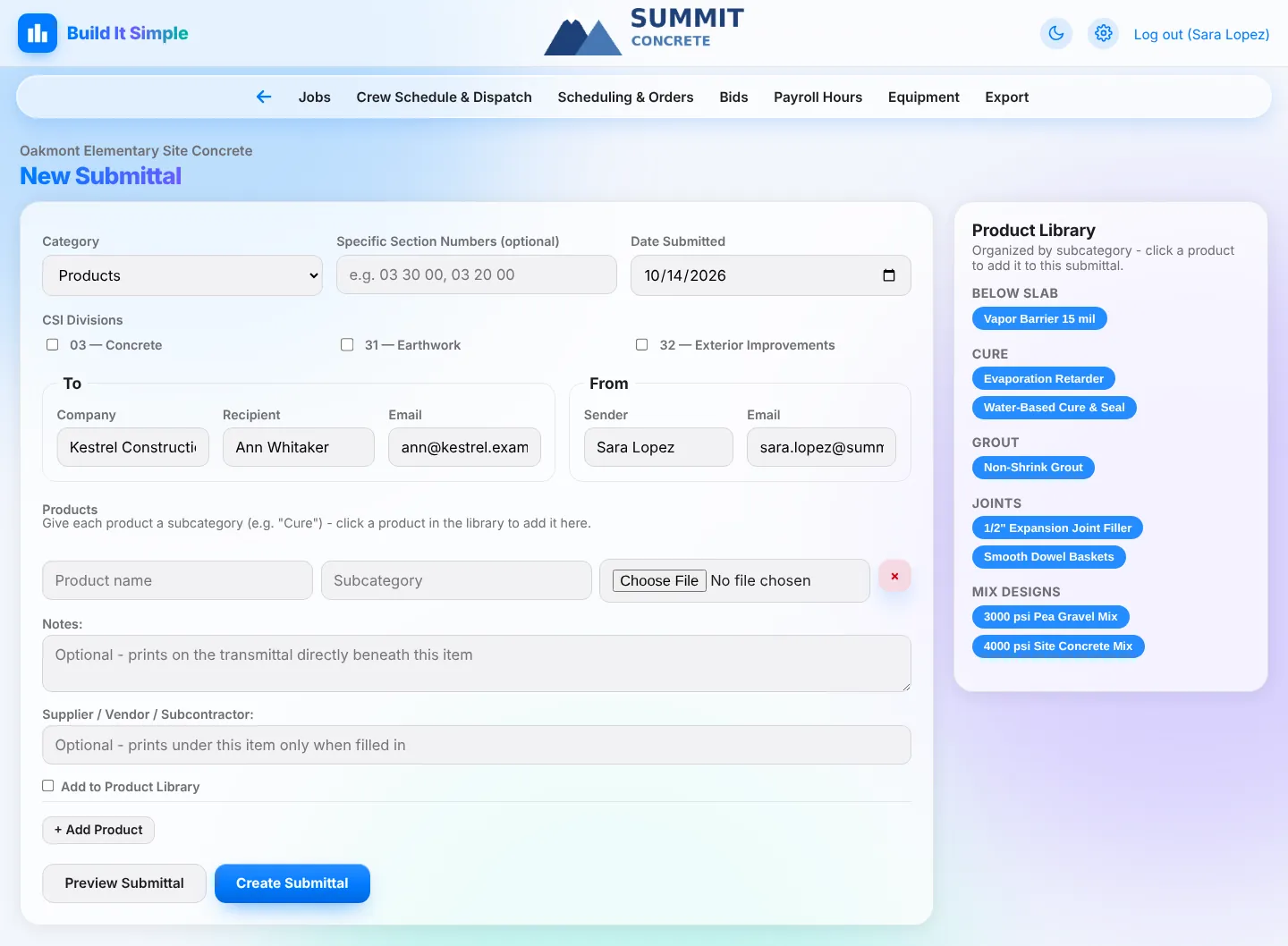
Submittals with a product libraryBuild transmittals in minutes instead of retyping the same products every job.
- Auto-numbered submittals with your prefix; To / From pre-filled from the job’s GC and your own info
- Product Library grouped by subcategory: click a product to add it; attach each product’s data sheet
- Generated PDF: letterhead cover sheet followed by each product’s data sheet; ‘Email It’ opens a ready-to-send draft
- Record responses per product (Approved, Approved as Noted, Corrected as Noted, Rejected); field crews see only approved products
RFIs, from field question to answerQuestions get asked, tracked and answered without falling through the cracks.
- Auto-numbered RFIs with cost / schedule impact, attachments and a PDF with a draft email
- Foremen send a Draft RFI with photos to their PM, who converts it to a real RFI in one click
- Record answers with attachments; answered RFIs show on the foreman’s job view
- Upload-only log for RFIs handled outside the app; overdue RFIs surface on the Jobs list
 Click to enlarge
Change orders, SOV and directives without a spreadsheet
Price a change order request from your rate sheet, turn the bid into a Schedule of Values, and hand the foreman a clear field directive.
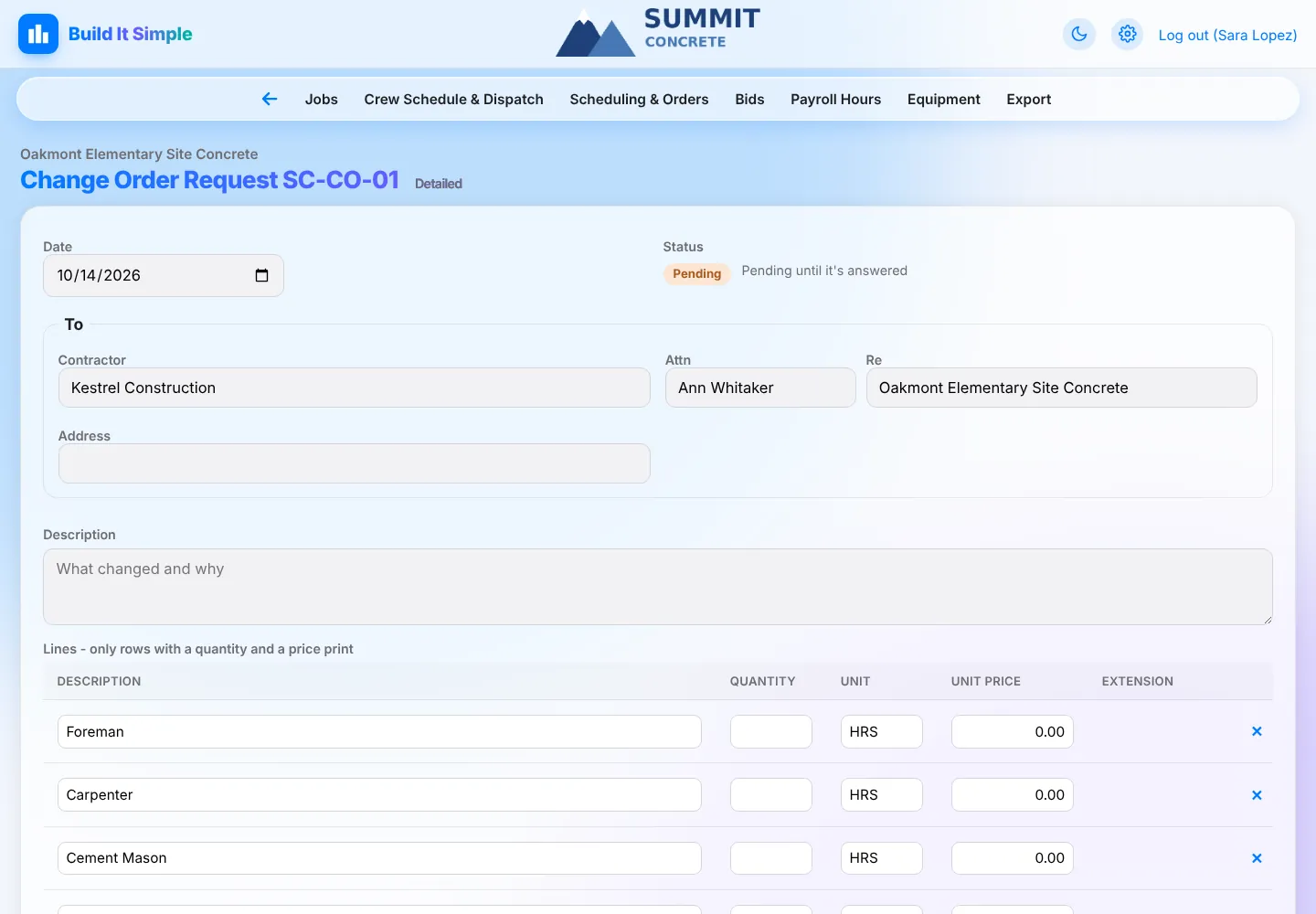
Change Order Request builderPrice and send a change order request without a spreadsheet.
- Lump Sum or Detailed requests: labor, material and equipment rows priced from your rate sheet, sub-total, mark-up and TOTAL ADD
- Numbered with your own prefix and saved as a PDF plus an Excel copy
- Track Pending, Approved or Rejected with the GC’s official CO number, approved amount and signed copy
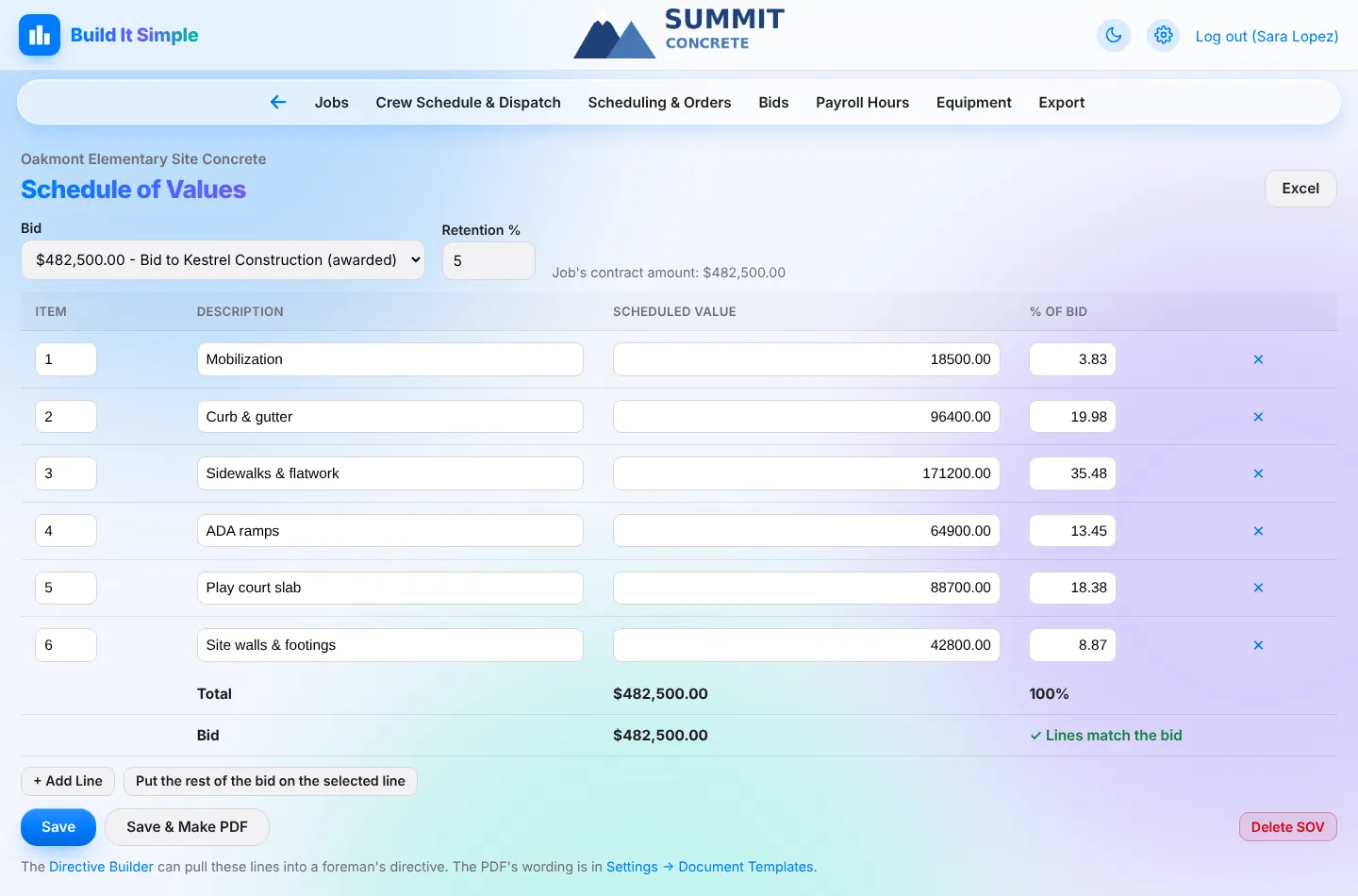
Schedule of ValuesTurn the bid into a billing-ready SOV.
- Start from the awarded bid’s items (AI can read them from the bid PDF), your standard lines, or blank
- Shows % of bid per line and checks that the lines add up to the bid
- Retention %, saved as a PDF and an Excel copy for the GC
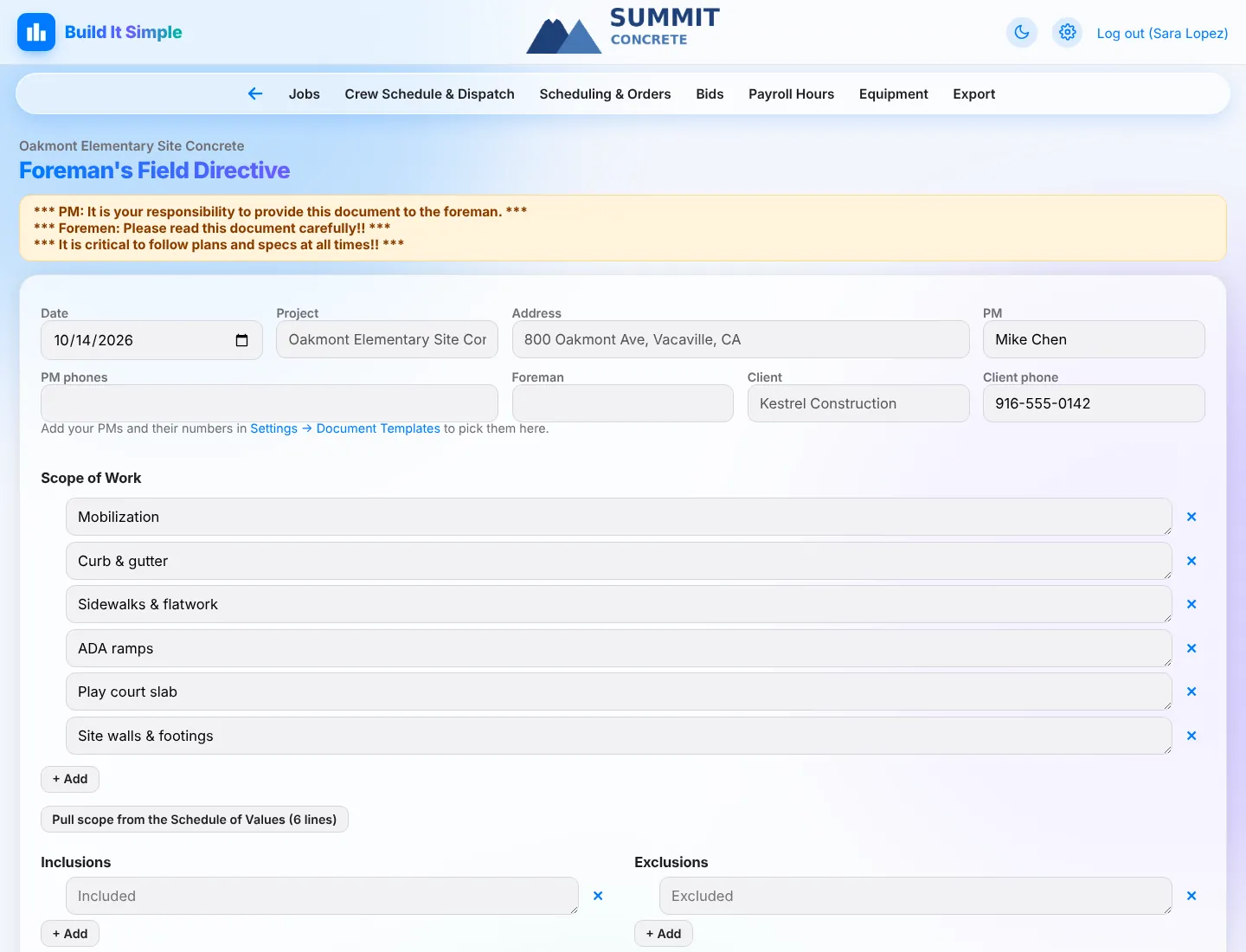
Foreman’s Field DirectiveHand the foreman a clear scope before the first pour.
- Laid out like your own directive form: job, PM and phones, foreman, client
- Numbered scope, requirements and clarifications, inclusions and exclusions, suppliers and subs to use, no prices
- ‘Pull scope from the Schedule of Values’ fills the scope in one click; save as draft or issue a numbered PDF
 Click to enlarge
Build tomorrow’s crew schedule, then text it out
Click names onto jobs, send one text per person, and watch the YES / NO replies come in.
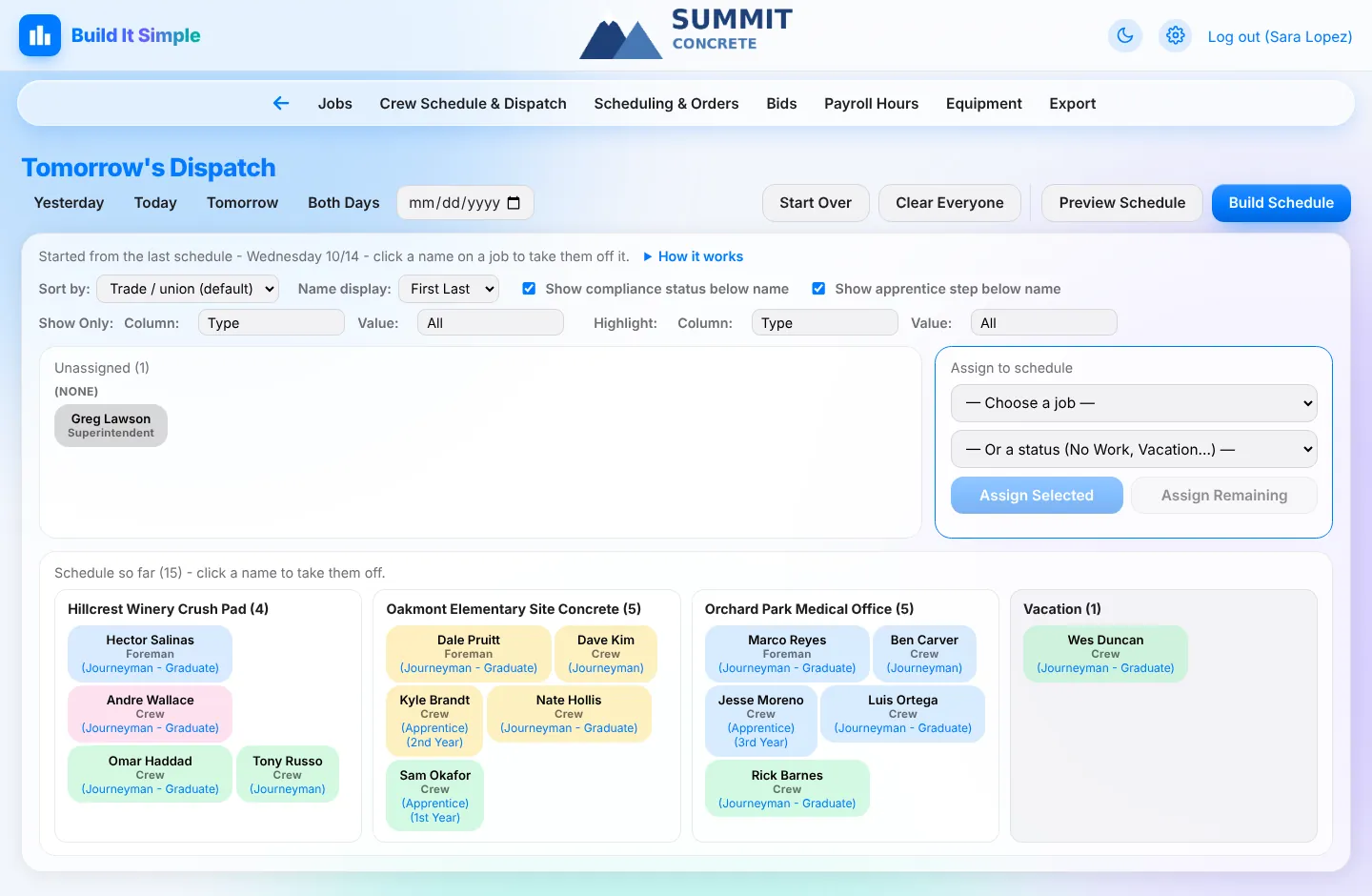
Dispatch boardBuild tomorrow’s crew schedule by clicking names, not by making phone calls.
- Everyone shows as a name chip colored by trade / union, with compliance status and apprentice step
- Assign to a job or a status (No Work, Vacation, Sick, Apprentice School...); split days across two jobs
- Per-job start time, particulars and flags (concrete pour, night work, special conditions)
- Saves as you go, starts from the last schedule, with Preview, Recall and Start Over
Texts with YES / NO confirmationsKnow who’s coming before the trucks roll.
- One text per person with job, start time, address and map link, gate code, access details, restrictions and particulars
- Crew replies YES or NO; Today’s Crew Schedule shows Confirmed, Can’t make it, or No reply on every name
- Header counts: ‘11 confirmed · 1 can’t make it · 2 no reply yet’
Today’s and past crew schedulesA live crew sheet anyone in the office can print.
- Today beside the next work day: who’s where, crew counts, who’s off and who’s not assigned yet
- Any past day exactly as it was dispatched
- Export a date range of dispatched days as PDF (a page per day) or CSV for Excel
 Click to enlarge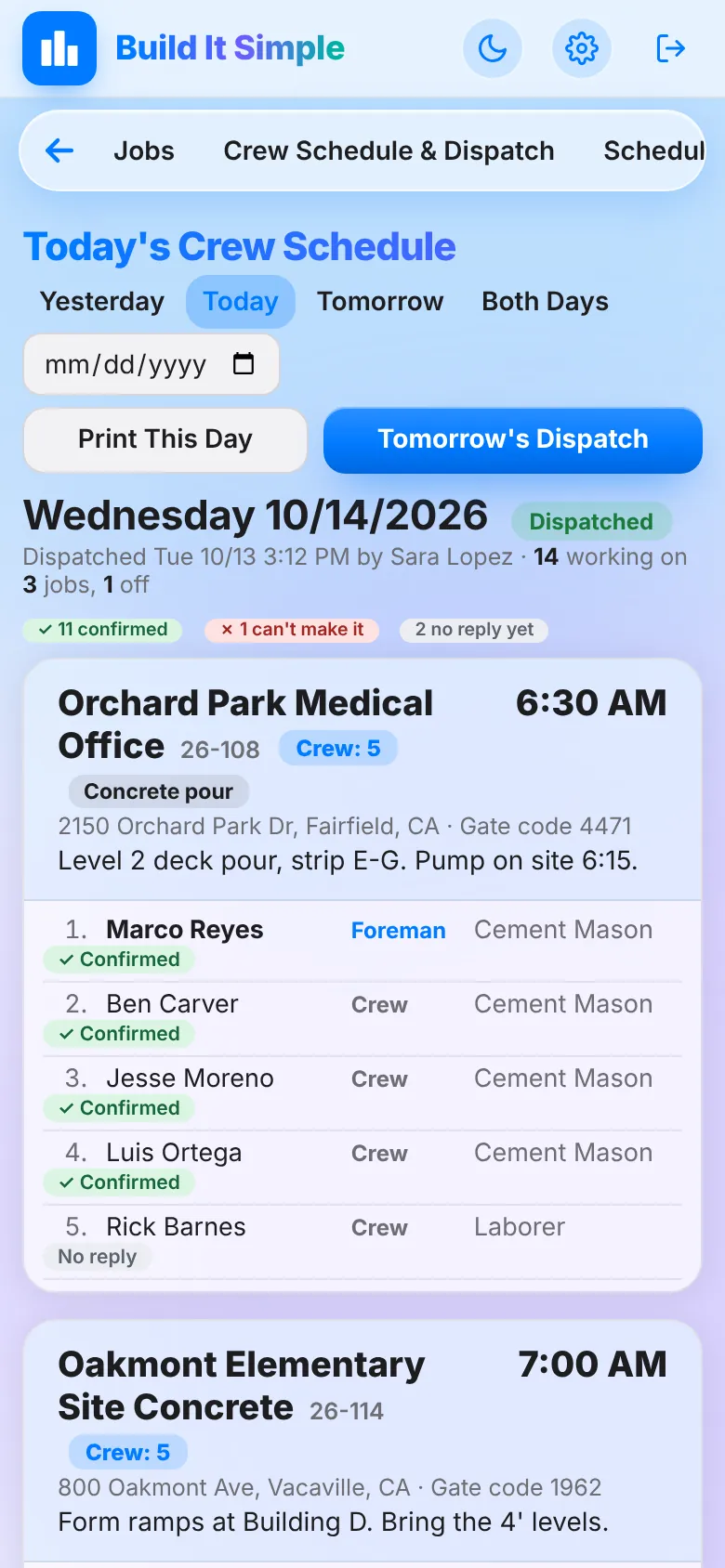
Field paperwork, finished from the truck
Daysheets, extra work orders, photos, punch lists, safety meetings and injury reports, all from the foreman’s phone.
Digital daysheetsThe full paper Daily Field Report, finished from the truck.
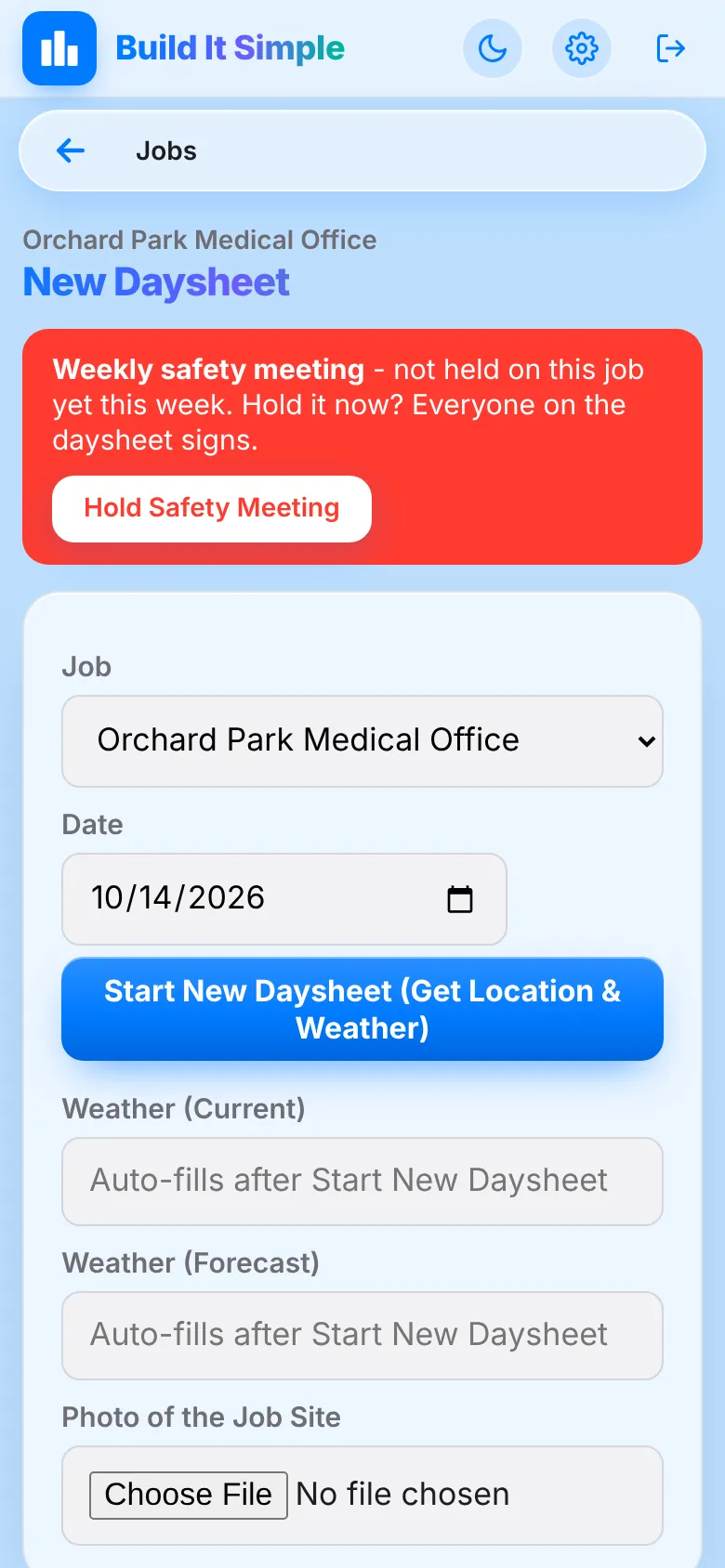
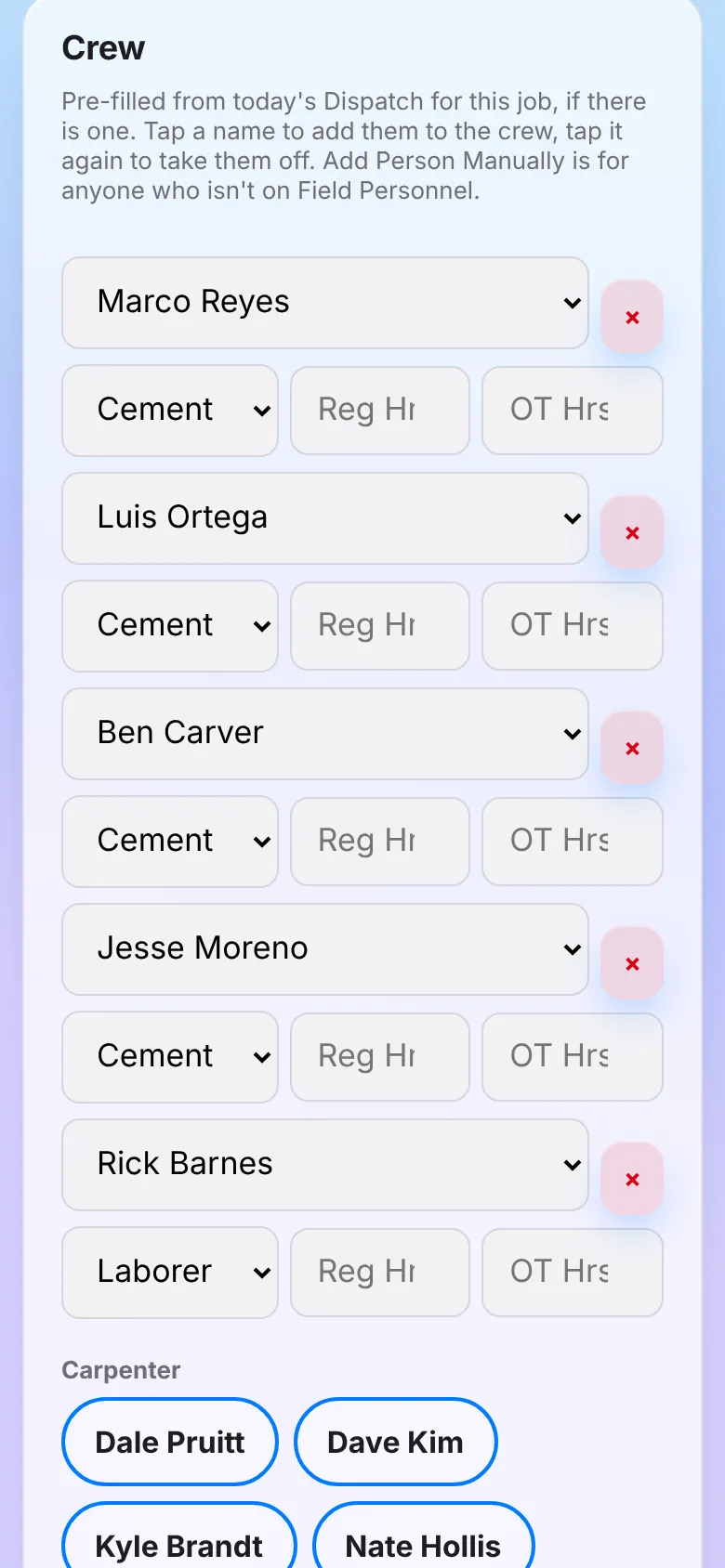
- One tap fills in location and current weather; crew is pre-filled from today’s dispatch
- Concrete, deliveries, pumps and cranes with ticket photos; equipment, subs, materials, notes
- 11-item daily safety checklist, safety meeting and injury questions
- Checks before submitting (missing ticket photos, over 8 regular hours), ‘Done for Now’ to finish later, and a PDF in your own layout
Extra work orders with signaturesGet the extra work signed on site and sent to the GC.
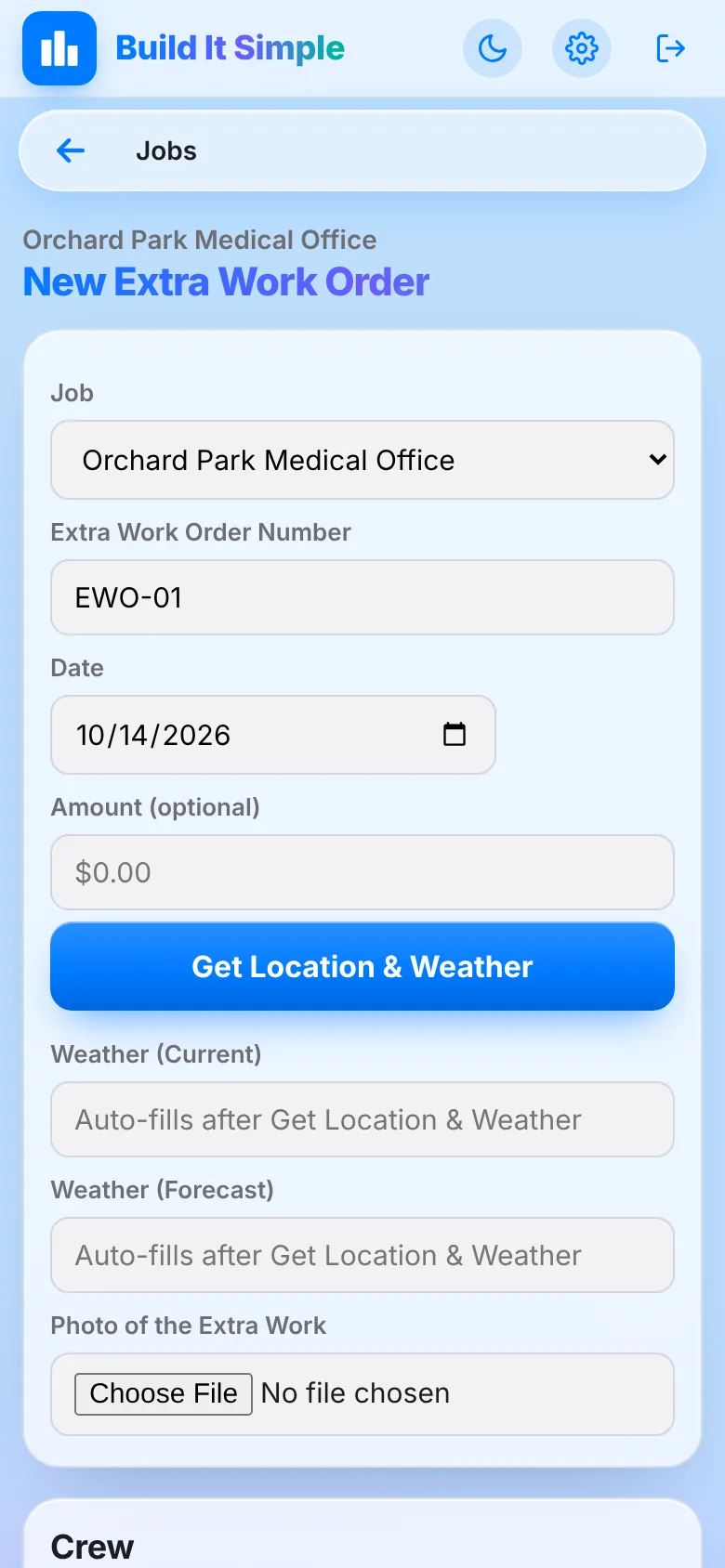
- Crew, hours, description, photos, materials and equipment
- Requested-by name, title and company with an on-screen signature
- PDF plus a ready-to-send email draft to the GC with photos attached; amount can be figured from crew hours and your rates
Photos, punch lists, safety and injuriesEvery field record lands on the job automatically.
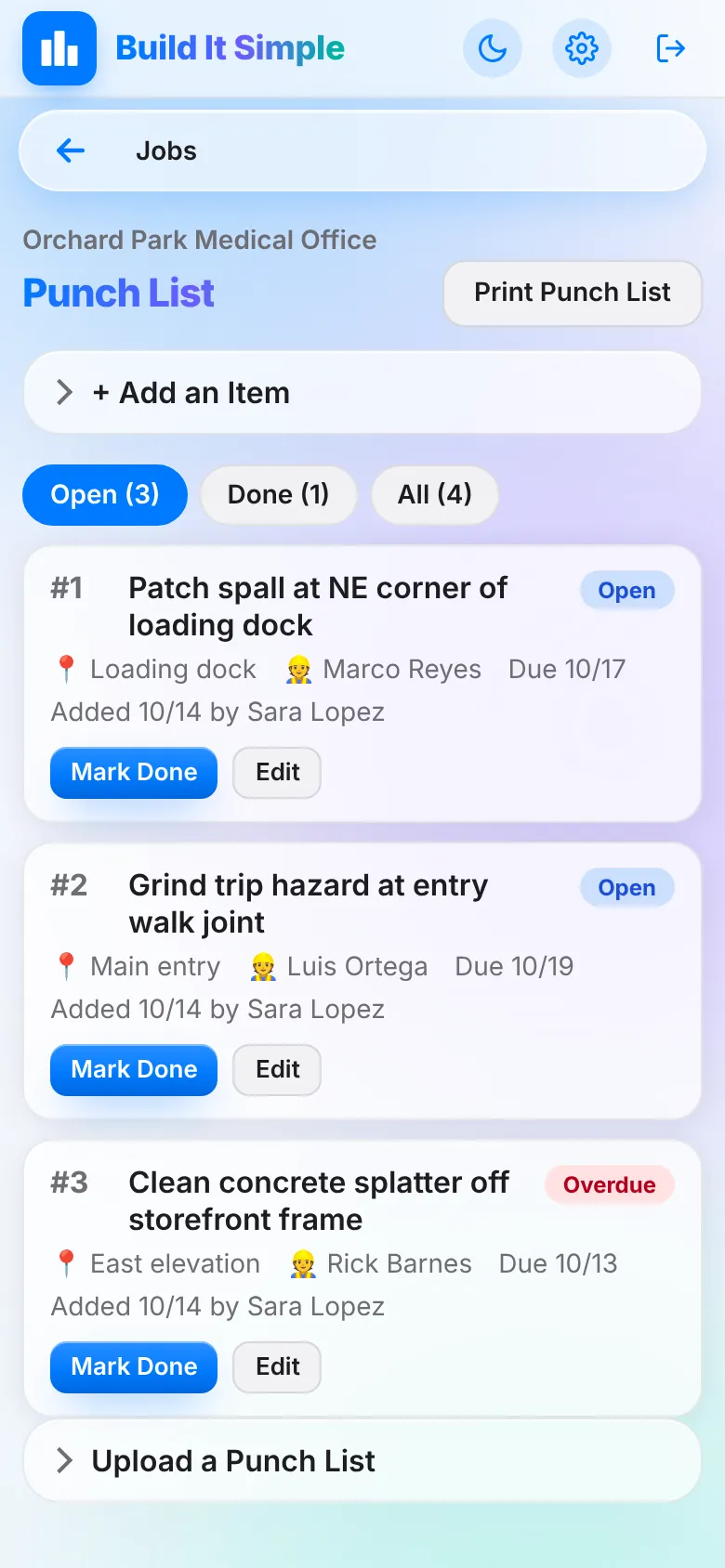
- Job photos from the phone camera; punch list items with photos, due dates, overdue flags and ‘Mark Done’ with a photo of the fix
- Weekly safety meetings: this week’s topic picked automatically, everyone signs on screen
- Injury reports texted and emailed to the people you choose the moment they’re filed
- Guest Access lets a foreman share a job with another foreman
Field job viewForemen see exactly what they need and nothing they don’t.
- Big buttons for Daysheet, Extra Work Order and Job Photos
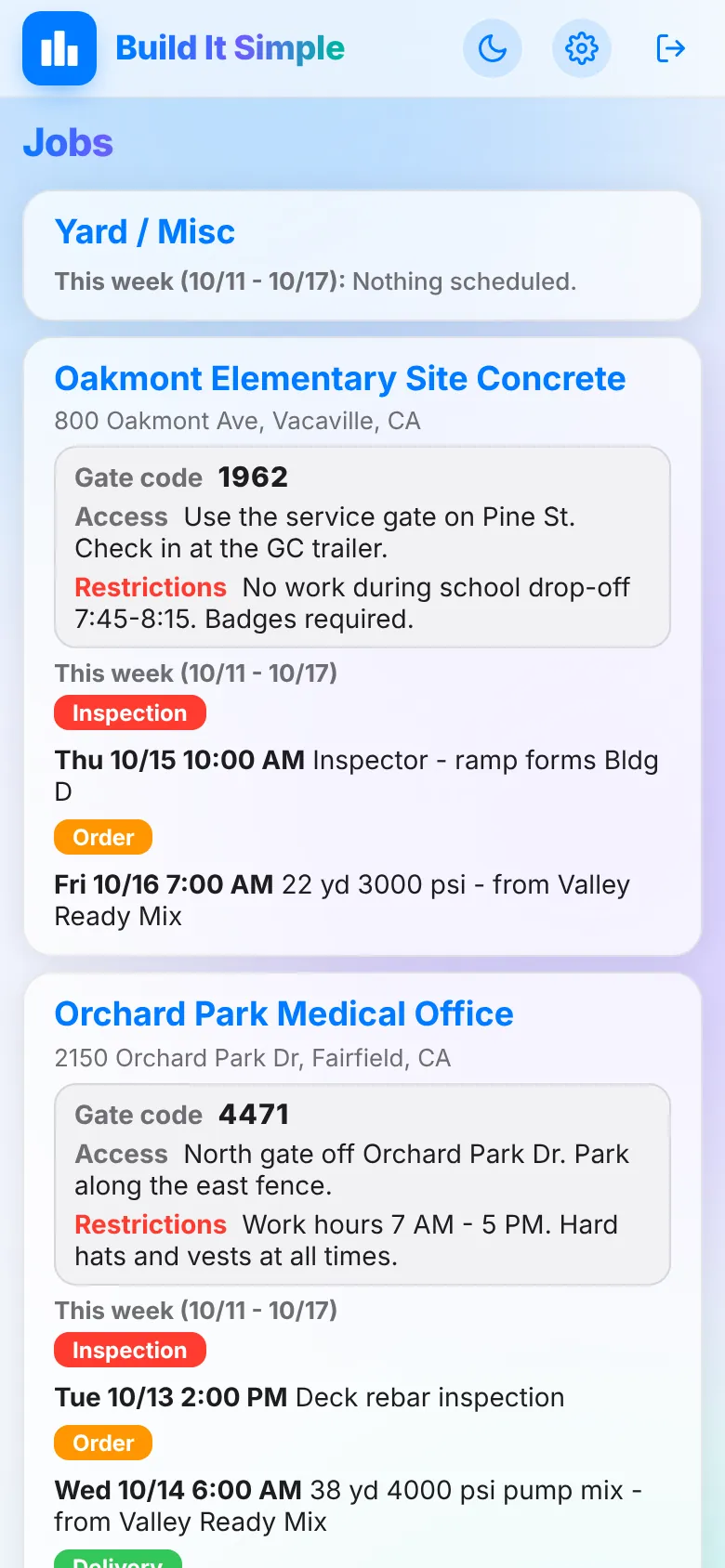
- This week’s orders, inspections, deliveries and tasks; directions, gate code and site access
- Answered RFIs, approved submittal products, plans & specs, punch list
Payroll hours that build themselves
Weekly hours come straight from the daysheets the field already turned in, with the odd ones flagged for a second look.
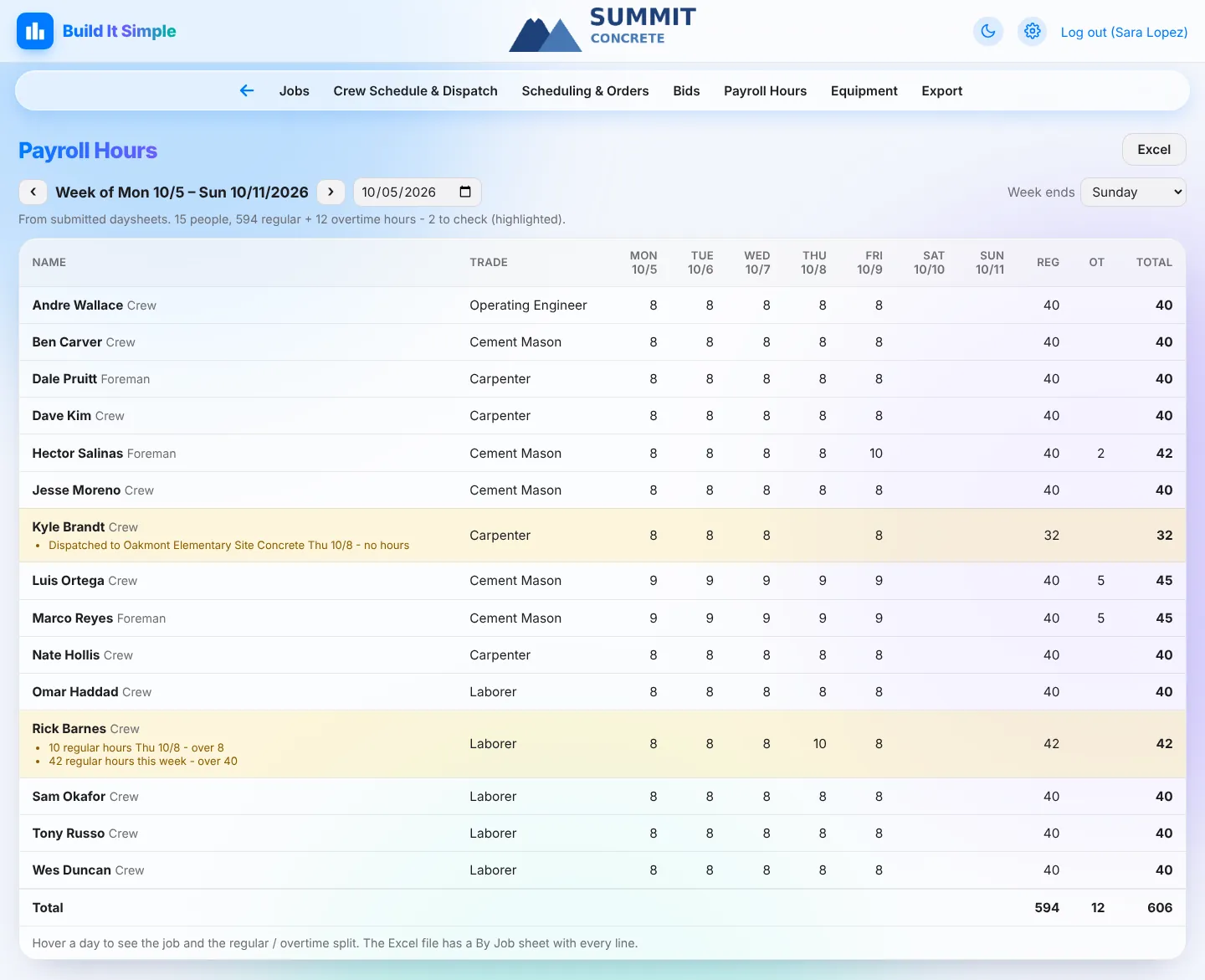
Payroll hours from daysheetsPayroll totals build themselves from what the field already turned in.
- A week per person: each day, regular, overtime, total; hover a day for the job and split
- Flags what needs a second look: over 8 regular hours in a day, over 40 in a week, dispatched with no hours, listed twice on a job’s daysheets the same day
- Group by name, trade or union; Excel download with a By Job sheet; set the day your payroll week ends
Skilled & Trained / apprentice reportsKnow each month whether a public works job meets its workforce rules.
- Hours by craft split into graduate journeypersons, other journeypersons and apprentices from Field Personnel
- Checks the graduate percentage (default 60%) and the apprentice ratio (default 1 hour per 5)
- Monthly report PDF and Excel; settings map your union statuses
 Click to enlarge
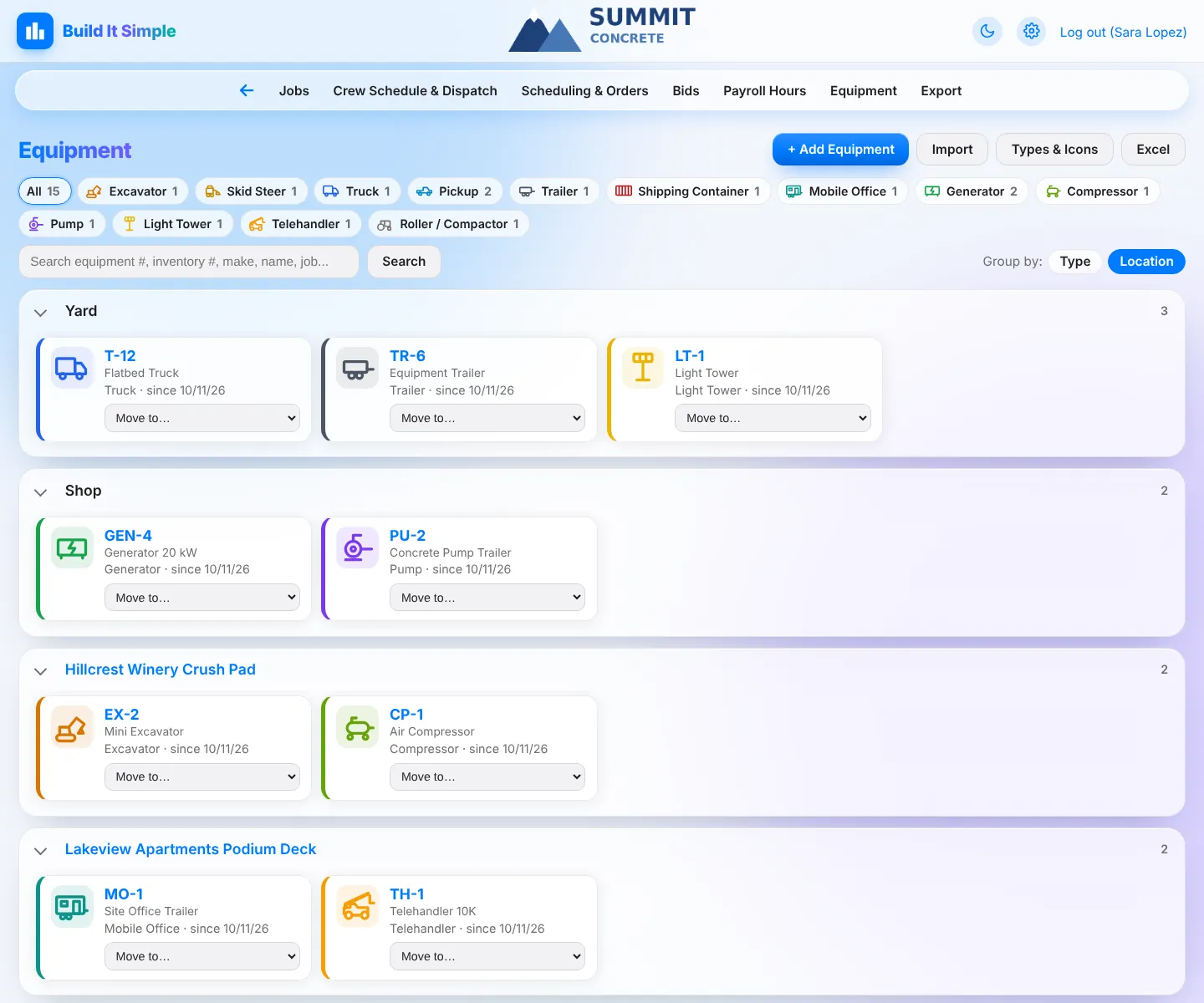
Know where every truck, trailer and compactor is
Equipment cards grouped by type or by location, moved with one click, with who moved it and when.
Equipment trackingKnow where every truck, trailer and compactor is.
- Cards with icons and colors per type, grouped by type or by location (yard, shop, each job)
- ‘Move to...‘ from the card, with who moved it and when
- Import your list from Excel or CSV, export to Excel, and set up your own types and icons
 Click to enlarge
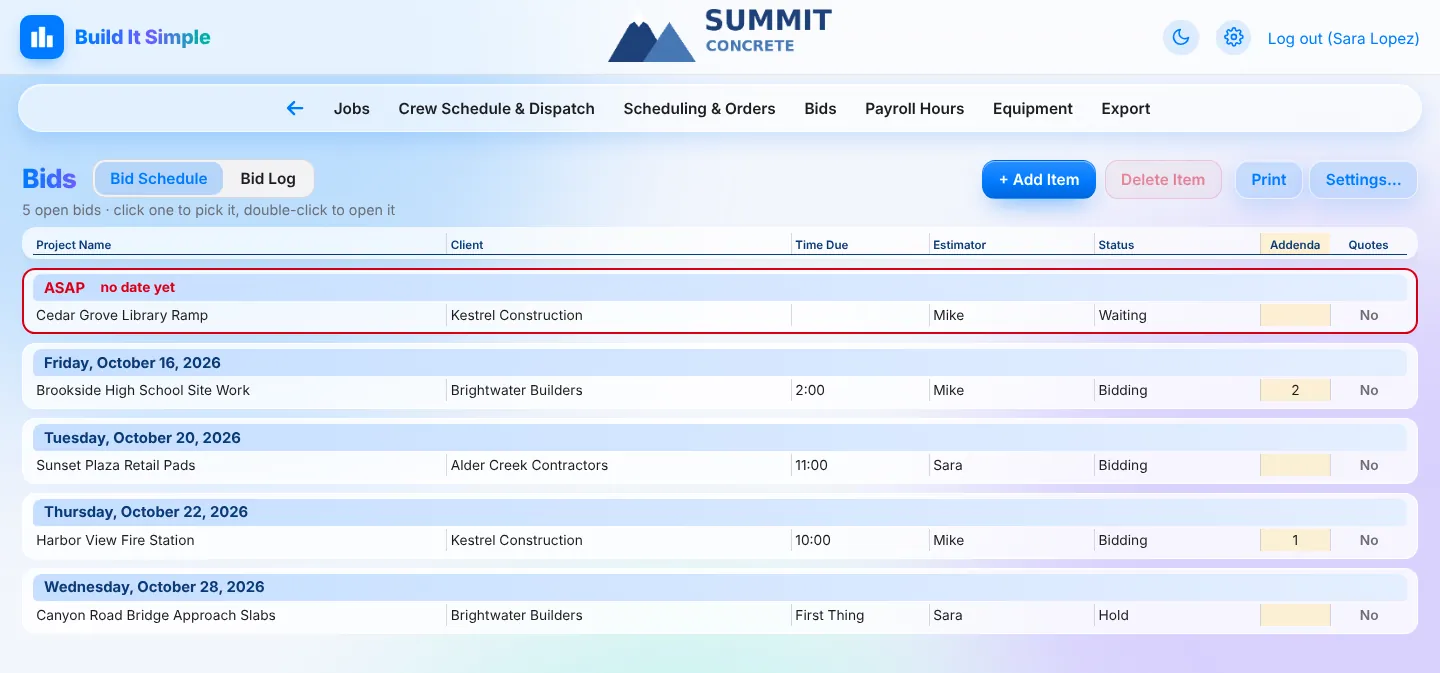
Every bid, then one click to a job
Open bids by due date, a searchable bid log, and Move to Jobs when you win one.
Bid scheduleEvery open bid in one list, with nothing slipping past due.
- ASAP bids on top, then by due date, with past due marked
- Each bid holds bid invites, the bids sent (one per bidder, with price), sub and supplier quotes and correspondence
- Bid items can be read from the bid by AI in the background, ready for the SOV
Bid log and Move to JobsYour bid history, searchable, and one click from bid to job.
- Every bid sent, by month, with price ranges across bidders; search across all years
- Choose and reorder columns; import an old Excel bid log
- Move to Jobs creates the job from the awarded bid and copies its bid, quotes and correspondence to the job
 Click to enlarge
Shared calendars the whole company edits live
Pour schedule, orders, deliveries and vacations in one place, set up with your own columns and colors.
Shared company calendarsPour schedule, orders, deliveries and vacations in one place everyone edits live.
- Day, week, month and year views; click a day and start typing
- Calendars with your own columns, drop-down lists and colors; task view with ASAP lines, done check boxes and past-due flags
- Holidays, special day notices, printable PDFs; other people’s changes show up within seconds
- Tasks: every job’s tasks, orders, inspections and deliveries in one list with done ticks, plus Lists for anything, shared or just for you
 Click to enlarge
Current drawings in the field, reports that make themselves
Share plan folders to a job, export documents in one go, and let the weekly report and missing-daysheet texts run on their own.
Plans & specs sharingField crews always open the current drawings.
- Assign files or whole folders from the company share folder to a job
- Folders stay live, and files always open their latest version
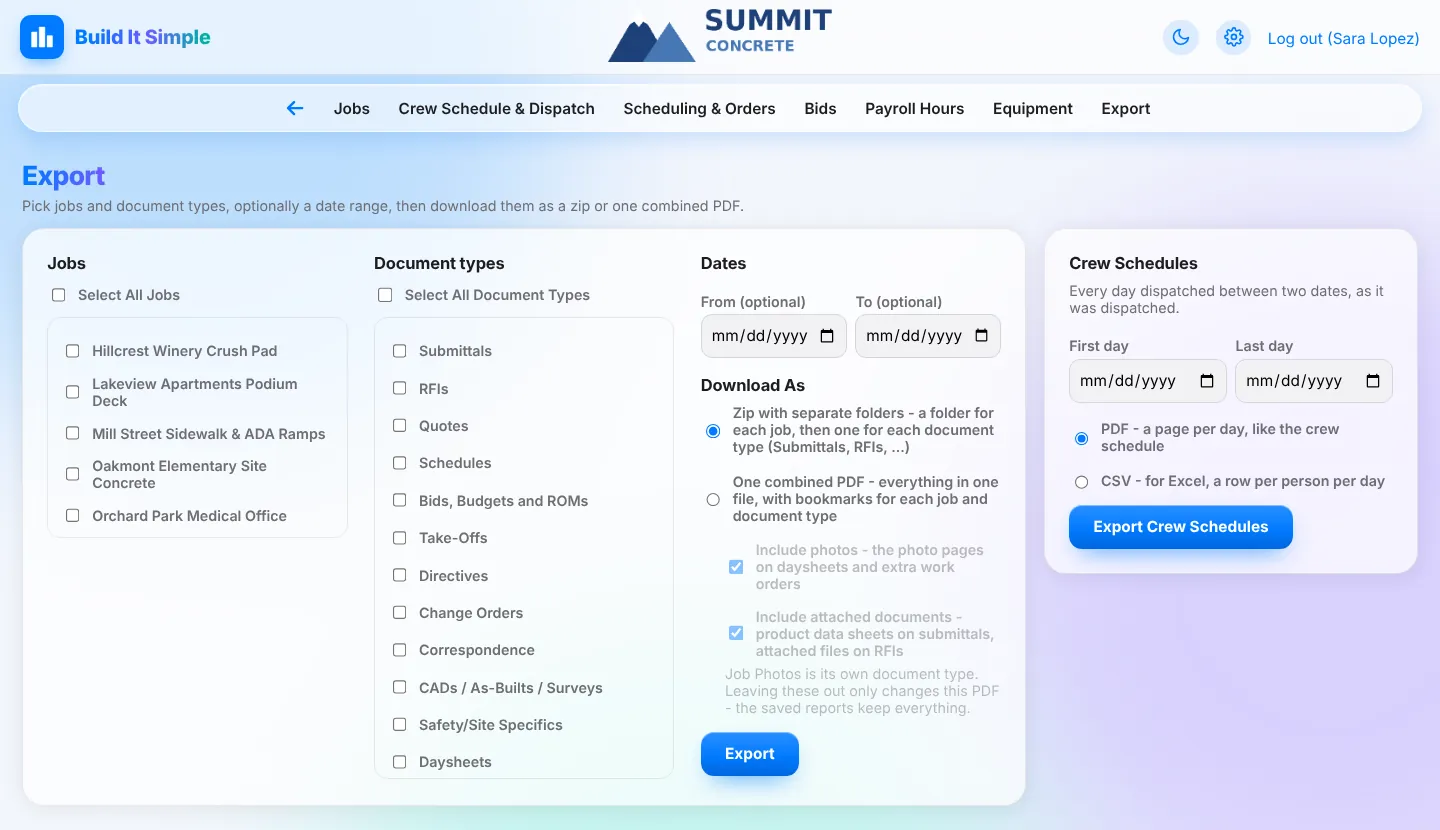
Exports and automatic reportsGet documents out and keep everyone informed without extra work.
- Export job documents as a zip (a folder per job and type) or one bookmarked PDF
- Weekly Job Report PDF made automatically: the week’s daysheets, missed days, EWOs, open RFIs, submittals and change orders
- 6 PM missing-daysheet texts to foremen and PMs (Automations)
 Click to enlarge
Ask in plain words
An assistant that looks things up and does simple jobs after you say so, plus a how-to helper for questions about the app.
AssistantAsk in plain words: look things up or get simple things done.
- e.g. ‘daysheets from last week’, ‘pending submittals on Oak St’, ‘where is the telehandler?‘
- Can add punch list items, move equipment, create an SOV or change a CO status, always after you click ‘Do it’
- Only sees what your own account can see
‘Chat with Matt’ helpHow-to answers without calling the office.
- The ? in the header answers ‘how do I...‘ questions with steps and links to the right page
- Explains only; it never sees or changes company data
Your company, set up your way
Your own subdomain and data, your letterhead and numbering, the features you use, and logins for every role.
Your company, your setupEach company gets its own private space, set up its way.
- Each company has its own subdomain and its own separate data
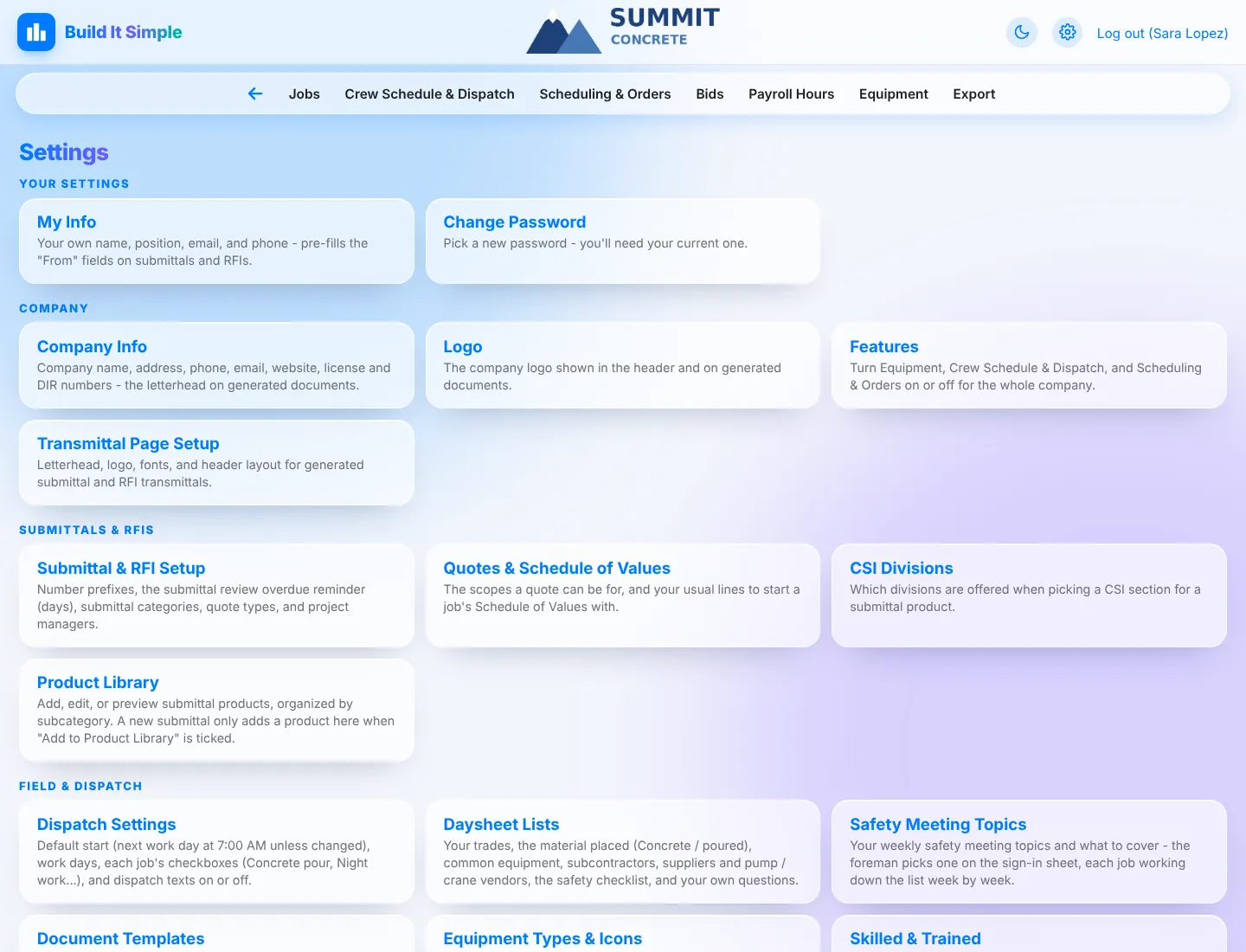
- Company info, logo and letterhead, numbering prefixes, CSI divisions, daysheet lists, safety topics, document templates
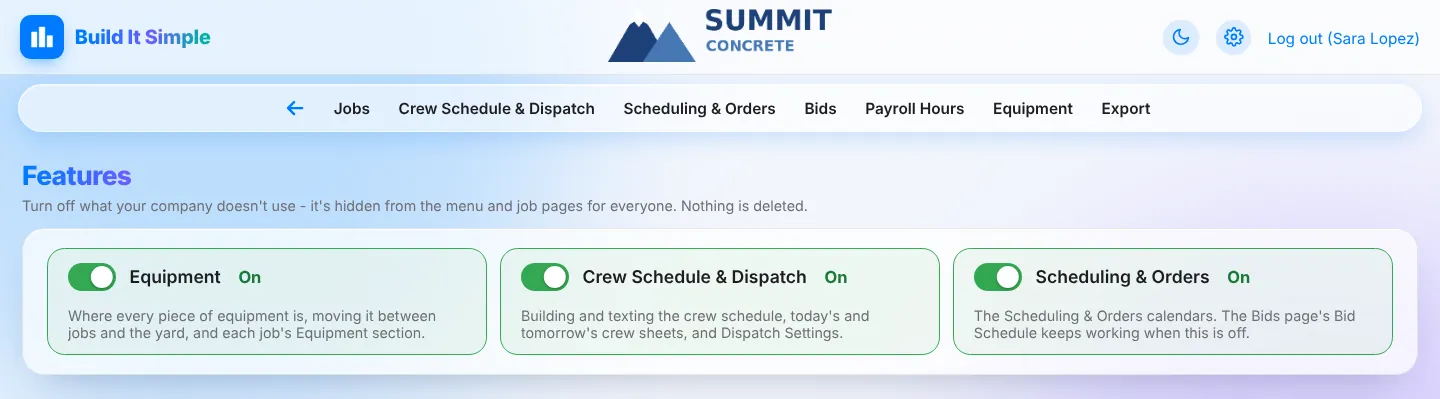
- Features switches: turn Equipment, Dispatching, Planning, Bidding or Payroll & Compliance off for the whole company
Roles and job accessEveryone sees what their job needs.
- Admin, PM, Dispatch, Superintendent, Foreman and Crew logins; log in with email
- Limit an account to assigned jobs
- Field Personnel roster with trade / union, compliance status and apprentice step; CSV import; trade colors
Works on any phone, plus an appOffice on the desktop, field on the phone.
- Phone-friendly web app that can be added to the home screen, with light and dark mode
- iPhone and iPad app - coming soon
 Click to enlarge
Built for the truck, not the trailer
Foremen get big buttons and only what they need. Crews just get a text.
- Daysheet crew pre-filled from today's dispatch
- Ticket photos, safety checklist and signatures on the phone
- Gate codes, directions and approved products on every job
- Works in any phone browser and can be added to the home screen
Click around a job
Everything for a job lives on one page. Open one and see.
A simplified, clickable demo with made-up jobs. Click any job to open it.
One record, three ways to use it
Each login sees what that person's work needs, and nobody re-types what someone else already entered.
For the office
PMs, dispatch and the front office.
- Submittals from your product library, RFIs and follow-up emails
- Change order requests and a Schedule of Values from the bid
- Tomorrow's crew schedule texted out, with YES / NO replies
- Payroll hours built from the daysheets
For the field
Foremen, superintendents and crew.
- Daysheets with location, weather and crew filled in
- Extra work orders signed on site and sent to the GC
- Photos, punch lists, safety meetings and injury reports
- Draft RFIs with photos sent straight to the PM
For the owner
The whole company at a glance.
- A Jobs list that flags overdue submittals and unanswered RFIs
- A Weekly Job Report PDF made automatically
- Skilled & Trained and apprentice checks on public works
- Where every piece of equipment is, and a zip of every job at closeout
All of it, in one app
Turn off the areas you don't use: Equipment, Dispatching, Planning, Bidding and Payroll & Compliance each have a company-wide switch.
Jobs & project documents
- Every job, one page
- All of a job’s info, documents and field records live in one place you can scan in seconds.
- Jobs list that flags what’s late
- See what needs a nudge without opening every job.
- USA ticket tracking
- Never dig without a live ticket.
- Project documents in one place
- Directives, safety plans, CADs, correspondence, schedules, bids, take-offs and quotes, all filed by job.
Submittals & RFIs
- Submittals with a product library
- Build transmittals in minutes instead of retyping the same products every job.
- RFIs, from field question to answer
- Questions get asked, tracked and answered without falling through the cracks.
Change orders, SOV & directives
- Change Order Request builder
- Price and send a change order request without a spreadsheet.
- Schedule of Values
- Turn the bid into a billing-ready SOV.
- Foreman’s Field Directive
- Hand the foreman a clear scope before the first pour.
Crew schedule & dispatch by text
- Dispatch board
- Build tomorrow’s crew schedule by clicking names, not by making phone calls.
- Texts with YES / NO confirmations
- Know who’s coming before the trucks roll.
- Today’s and past crew schedules
- A live crew sheet anyone in the office can print.
Field reports from the phone
- Digital daysheets
- The full paper Daily Field Report, finished from the truck.
- Extra work orders with signatures
- Get the extra work signed on site and sent to the GC.
- Photos, punch lists, safety and injuries
- Every field record lands on the job automatically.
- Field job view
- Foremen see exactly what they need and nothing they don’t.
Payroll & labor compliance
- Payroll hours from daysheets
- Payroll totals build themselves from what the field already turned in.
- Skilled & Trained / apprentice reports
- Know each month whether a public works job meets its workforce rules.
Bidding
- Bid schedule
- Every open bid in one list, with nothing slipping past due.
- Bid log and Move to Jobs
- Your bid history, searchable, and one click from bid to job.
Scheduling & orders
- Shared company calendars
- Pour schedule, orders, deliveries and vacations in one place everyone edits live.
Plans, exports & reports
- Plans & specs sharing
- Field crews always open the current drawings.
- Exports and automatic reports
- Get documents out and keep everyone informed without extra work.
AI help built in
- Assistant
- Ask in plain words: look things up or get simple things done.
- ‘Chat with Matt’ help
- How-to answers without calling the office.
Company setup, roles & apps
- Your company, your setup
- Each company gets its own private space, set up its way.
- Roles and job access
- Everyone sees what their job needs.
- Works on any phone, plus an app
- Office on the desktop, field on the phone.
Interested? Let's talk.
Tell us a little about your company and we'll get back to you to set up a walkthrough, usually within one business day.
- A live demo with your own jobs
- Help moving over your crew and job lists
- No commitment
Ready to simplify your jobsite?
Already a customer? Log in to pick up right where your team left off.